


IMAGE PROCESSING INFRASTRUCTURE / NODE.JS

One source.
Every rendition.

RenditionKit turns an original image into responsive AVIF and WebP files in a background worker. Your queue, storage, and asset records stay under your control.

INPUT / 01IMAGE ENGINE READY
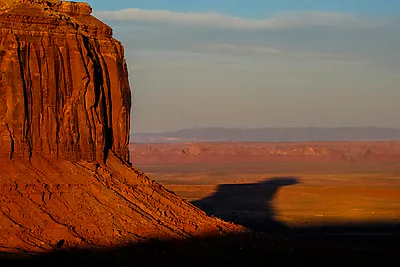
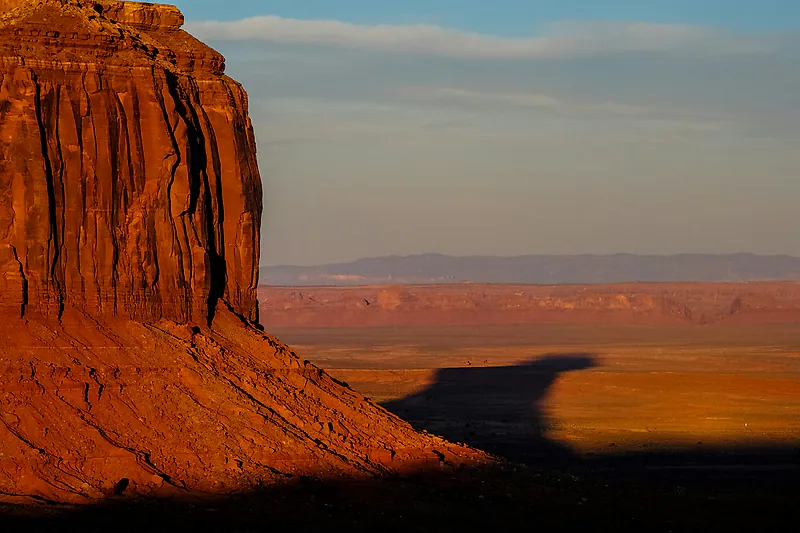
Sunlit orange desert butte, the source photograph used in the RenditionKit demonstration
ORIGINAL ASSETsource.jpg
DIMENSIONS3200 × 2133
SIZE1237 KB
QUEUE-NEUTRAL CORESHARP IMAGE ENGINEMIT LICENSEDv0.1.1
01 / TRACE THE PIPELINE

One source goes in.
Eight files come out.

Start with one original.

SOURCE / 01● ORIGINAL
Original photograph of a sunlit orange desert butte
source.jpg3200 × 2133 · 1237 KB
ASSET / IMAGE
site-demo
ENGINE
Sharp
STATE
QUEUEDPROCESSINGCOMPLETE ✓
01400px✓
The demo photograph rendered at 400 pixels wide
AVIF 8.9 KBWEBP 16.7 KB
02800px✓
The demo photograph rendered at 800 pixels wide
AVIF 29.3 KBWEBP 57.8 KB
031600px✓
The demo photograph rendered at 1600 pixels wide
AVIF 101 KBWEBP 198 KB
042400px✓
The demo photograph rendered at 2400 pixels wide
AVIF 189 KBWEBP 353 KB
STORAGEObjectStorage adapter
08 FILES ✓
WAITING FOR ASSET
THE CODE BEHIND THE OUTPUT

Same source.
Every width.

The image engine shown here uses RenditionKit's default width ladder and output formats. Register it in a worker runtime to process queued assets.

image-engine.ts
import { createImageEngine } from "renditionkit/image";

const imageEngine = createImageEngine({
  widths: [400, 800, 1600, 2400],
  formats: ["avif", "webp"],
});
See the complete worker setup
SOURCEJOBPROCESSRENDITIONSSTORECODE

Queue states are an illustration. The image files and sizes shown were generated with RenditionKit and a local storage adapter.

01 / TRACE THE PIPELINE

One source goes in.
Eight files come out.

A real source image, processed with RenditionKit's defaults.

SOURCE / 01● ORIGINAL
Original photograph of a sunlit orange desert butte
source.jpg3200 × 2133 · 1237 KB
ASSET / IMAGE
site-demo
ENGINE
Sharp
STATE
QUEUEDPROCESSINGCOMPLETE ✓
01400px✓
The demo photograph rendered at 400 pixels wide
AVIF 8.9 KBWEBP 16.7 KB
02800px✓
The demo photograph rendered at 800 pixels wide
AVIF 29.3 KBWEBP 57.8 KB
031600px✓
The demo photograph rendered at 1600 pixels wide
AVIF 101 KBWEBP 198 KB
042400px✓
The demo photograph rendered at 2400 pixels wide
AVIF 189 KBWEBP 353 KB
STORAGEObjectStorage adapter
08 FILES ✓
THE CODE BEHIND THE OUTPUT

Same source. Every width.

Register this image engine in a worker runtime to process your own assets.

image-engine.ts
import { createImageEngine } from "renditionkit/image";

const imageEngine = createImageEngine({
  widths: [400, 800, 1600, 2400],
  formats: ["avif", "webp"],
});
See the complete worker setup ↗

Queue states are illustrative. The files and sizes shown were generated with RenditionKit and a local storage adapter.

02 / PURPOSE BUILT

Image work, with
fewer assumptions.

RenditionKit handles the repeatable parts of an image pipeline while leaving your application's data model and delivery URLs to you.

01 / IMAGE ENGINE◩

Inspect once.
Render what fits.

The Sharp engine validates input, applies orientation, converts to sRGB, and writes width-specific AVIF and WebP renditions. It never enlarges an image beyond its source width.

40080016002400 px
02 / QUEUE ADAPTER

Background jobs that recover.

The BullMQ adapter deduplicates overlapping enqueues and supports retries, dead letters, and stalled-attempt recovery when the repository provides it.

QUEUED→PROCESSING→READY
03 / OUTPUT CONTRACT

Useful metadata, beside every file.

Stored renditions include format, dimensions, byte count, and a deterministic object key. Ready metadata includes a checksum and optional ThumbHash placeholder.

renditions/website/image/site-demo/v1/w800.webp
→→
03 / YOUR INFRASTRUCTURE

Bring the pieces
you already run.

The core is built around repository and storage contracts. The included adapters cover a practical Node.js stack.

RENDITIONKITProcess the asset.CORE + IMAGE ENGINE
QUEUEBullMQ + RedisOptional adapter
REPOSITORYPostgreSQLOr implement AssetRepository
PROCESSORSharpAVIF · WebP · optional JPEG
STORAGES3 · R2 · MinIOVia S3-compatible API
04 / HOW IT WORKS

Small job payload.
Full pipeline.

Your API stores the original and an asset record. It enqueues only the asset ID; the worker loads current data from the repository before processing.

01 / APPLICATIONStore the original.Create a durable asset record.
02 / QUEUEEnqueue the asset ID.BullMQ carries a small payload.
03 / WORKERInspect + transform.Sharp emits each rendition.
04 / STORAGESave + mark ready.Keys and metadata return to your app.
The API and worker can run as separate processes. Read the architecture ↗
05 / TRY IT

Get from source
to ready.

Install the package, configure an image engine and your adapters, then enqueue a durable asset. The reference app runs the full stack locally.

01Installnpm install renditionkit
02ConfigureRepository + storage + image engine
03Enqueueawait media.enqueue(assetId)
04ServeRead the stored rendition metadata
RENDITIONKIT / IMAGE PROCESSING

Put the pipeline
to work.

One source. Width-specific AVIF and WebP. Your infrastructure.